





デモ販売事例
使い方を見る


セットアップはとても簡単です。
-

アプリをインストール
Shopify App Storeで当社のアプリを見つけて、すぐにインストール
-

オプションを作成
ドラッグ&ドロップのフォームビルダーで簡単にオプションを追加
-

オプションを公開
自動化により複数の商品へオプションを一括適用


注目の機能
さまざまな目的に応える多彩なオプションタイプ
20種類以上のカスタム項目から、商品オプションを選んで組み合わせられます:


客単価を高める価格アドオン
オプションを既存のShopify商品バリエーションやその価格と紐付けることで、すべてのオプションに価格を設定し、追加料金として反映できます。
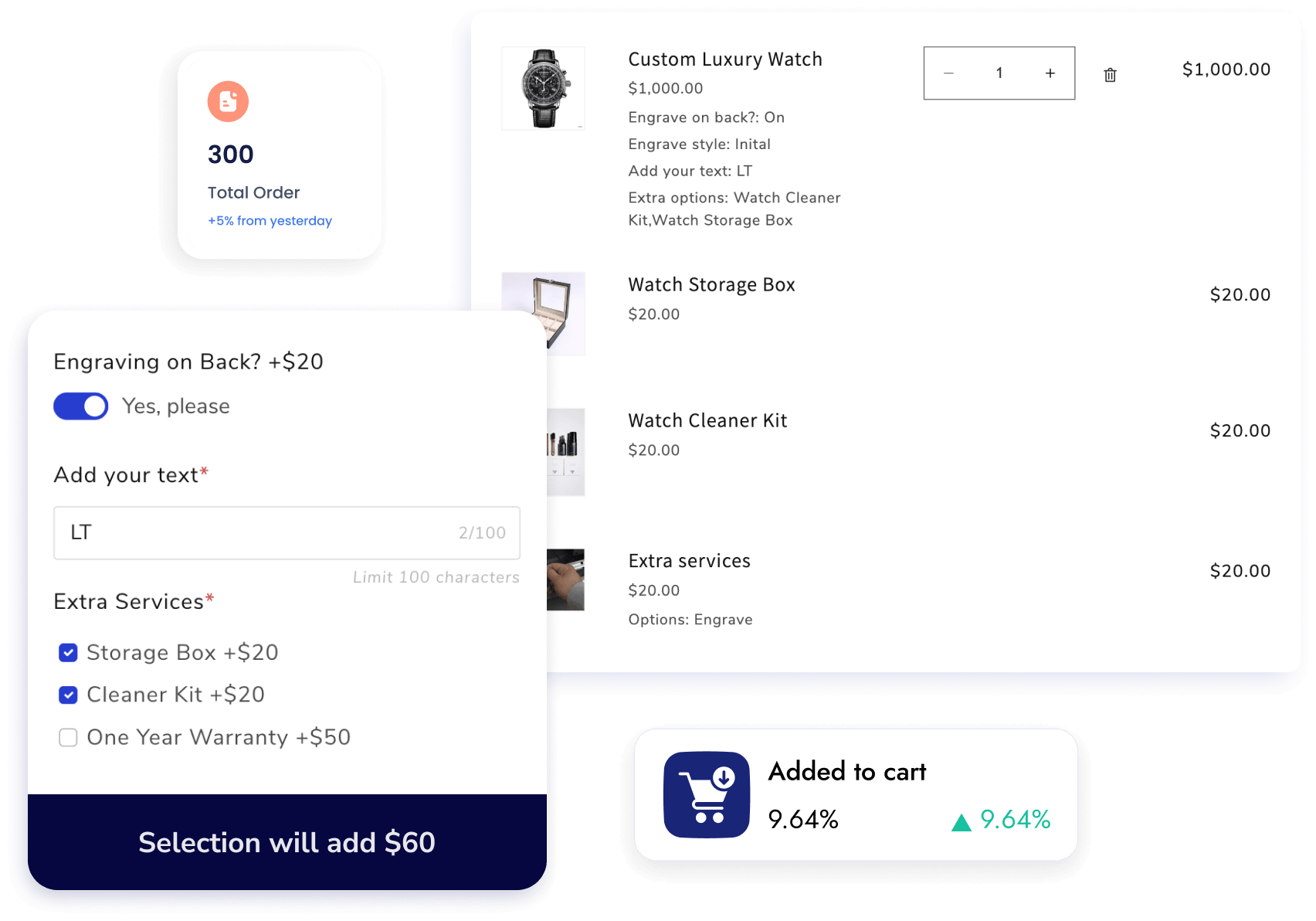
関連する選択肢を出す条件分岐
お客様がそれまでに選んだ項目や商品バリエーションに応じて、商品オプション項目を商品ページに表示するタイミングを設定できます。

史上最も使いやすい商品オプションアプリ
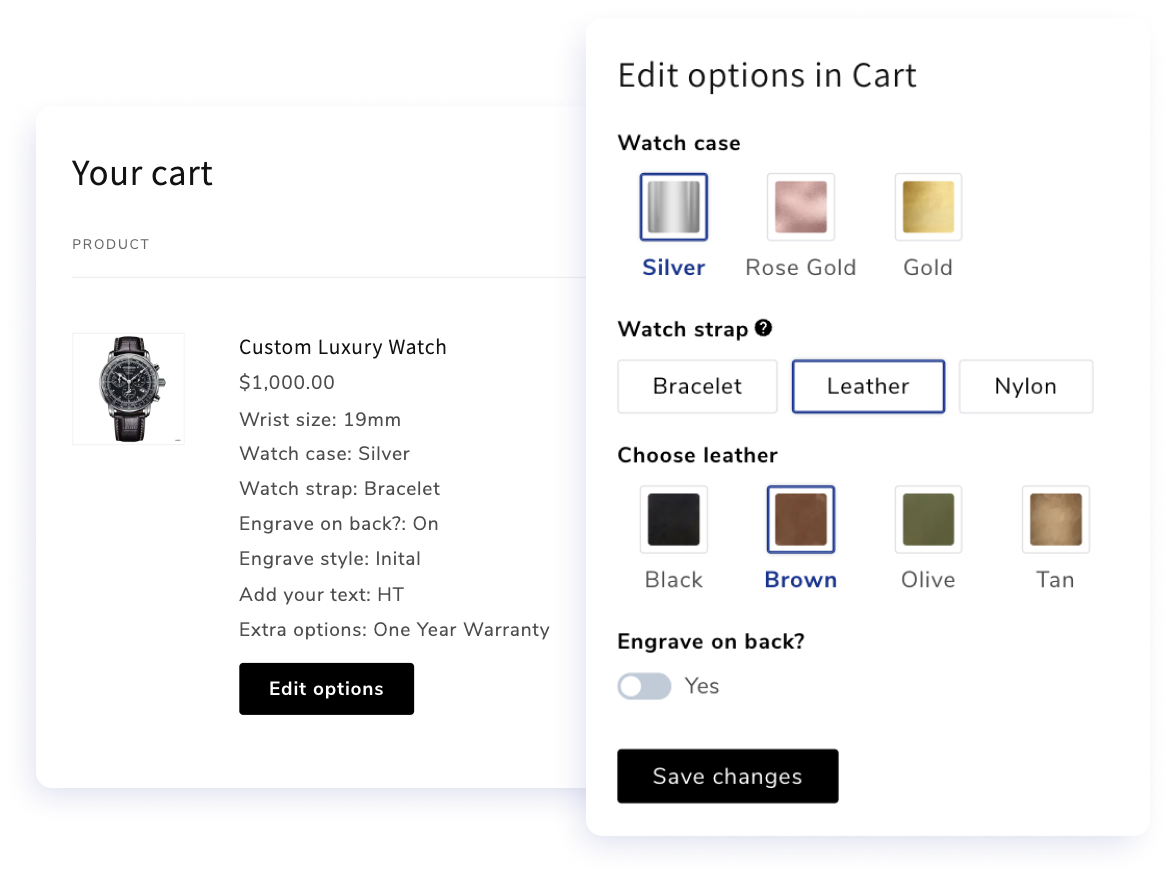
安心して購入できるカート内編集
チェックアウトの流れを離れることなく、すばやい修正や調整を可能にし、かご落ちを減らします。
魅力的なバリエーション選択のためのダイナミックスウォッチ
カラースウォッチ、画像スウォッチ、その他の形式(ボタン、ラジオ、ドロップダウン、画像/カラー付きドロップダウンなど)を使って、商品の特徴やオプションを引き立てます。
商品オプションテンプレートのAIレコメンド
ワンクリックでストアをスキャンし、商品に最適なオプションセットのテンプレートを提案します。特定のものが欲しいですか?プロンプトを入力するだけで、AIが提案を作成します。
あなたのことを考えて作られた、さらに多くの機能
-

オプションの初期選択
バイヤーが商品ページを訪れたときに、商品オプションの初期値をあらかじめ設定できます。
-

AIレコメンド
AIスキャンとテンプレート提案を使って、数秒で商品セットを設定
-

ツールチップと初期値
商品をカスタマイズする際に、お客様向けの簡単な説明やメモを表示できます。
-

フォーム表示
クイックビューのコレクションページや、ホームページの注目商品にダイナミックオプションを表示
-

全体スタイル設定
オプションのスタイル、表示タイプ、カラーをカスタマイズして、ブランドを反映できます。
-

必須/任意項目
項目を必須または任意に設定し、必須項目が空欄の場合は警告メッセージを表示できます。
-

ファイルアップロード形式の制限
あらゆる種類のファイルのアップロードを許可したり、特定の形式のみに限定したりできます
-

日付選択の制限
過去の日付、平日、特定の日など、お客様が選択できる/できない日付を制限できます
-

オプションの表示位置の変更
説明の下、数量セレクターの前に表示したり、ポップアップモーダルで開いたりできます
-

オプションをあらゆる場所に表示
カート、チェックアウト、注文詳細から、確認メール、納品書まで表示して、購入の安心感を高めます
-

オプション値ごとの数量
お客様が選んだ任意のオプション値に数量を設定できるようにします
-

ライブチャットサポート
私たちのサポートチームは、アプリ内のライブチャットでいつでも駆けつけます。


よくあるご質問
1. Qikify Custom Product Optionsは、Shopify標準の商品バリエーションやApp Storeの他のアプリと何が違うのですか?
Shopifyのネイティブバリエーションは組み合わせが100までに制限され、基本的なオプションタイプしか対応していません。多くのサードパーティアプリはそれを拡張しますが、条件分岐、価格アドオン、ファイルアップロードといった必須機能には追加料金がかかります。Qikifyなら、30種類以上のオプションタイプ、無制限のバリエーション、条件分岐、価格アドオンが、すべて無料プランから利用でき、すぐに始められるテンプレートも用意されています。
2. Qikify Custom Product Optionsではどんな商品オプションを作成できますか?
テキストボックス、画像・カラースウォッチ、ファイル・画像アップロード、日付・時刻ピッカー、チェックボックス、ドロップダウン、ラジオボタン、フォント選択、数量セレクターなど、合計30種類以上のオプションタイプがあります。特定の選択に価格アドオンを追加できるので、ギフトラッピングや特急対応などのオプションが注文合計に自動的に反映されます。
3. お客様の選択内容に応じてオプションを表示・非表示にできますか?
はい。条件分岐により、他のカスタムオプションや既存のShopifyバリエーションに基づいて、特定の選択が行われたときにだけ特定のオプションを表示できます。お客様は自分の選択に関係するものだけを見ることになり、商品ページはすっきりと分かりやすく保たれます。
4. 選択されたオプションは、注文、メール、請求書に表示されますか?
はい。カスタムオプションは注文、確認メール、請求書、納品書にわたって同期されるため、手作業で追跡しなくても、お客様が何をリクエストしたかをチームが常に完全に把握できます。
5. 複数の商品に一度にオプションを適用できますか?
はい。オプションセットを複数の商品に一括適用でき、CSVでオプションのインポート・エクスポートも可能です。大規模なカタログを管理している場合や、別の環境から移行する場合に、大幅な時間の節約になります。
6. Qikify Custom Product Optionsに無料プランはありますか?
はい。無料プランには、20種類以上のオプションタイプ、無制限のオプションセット、無制限の商品と注文、10種類以上の既製テンプレート、Shopifyバリエーションとの条件分岐、ライブチャットサポートが含まれます。月額$19.99のUnlimitedプランでは、価格アドオン、バンドル、日付ピッカー、ファイルアップロード、オプションごとの数量セレクター、CSVインポート/エクスポート、カート内で直接オプションを編集する機能が追加されます。料金について詳しくはこちらをご覧ください。
7. Qikify Custom Product Optionsでは技術サポートを受けられますか?
はい、無料を含むすべてのプランで受けられます。ライブチャットサポートが利用でき、チームはセットアップや設定から、テーマの互換性の問題の解決まで、親身に対応することで知られています。
お探しの答えが見つかりませんか?専任のサポートチームが、どんな問題でも喜んでお手伝いします。メール:contact@qikify.com
今日からあなたのShopifyストアでアプリを試してみましょう 👋
- 選択結果を選ぶと、ページが全面的に更新されます。
- 新しいウィンドウで開きます。